

Table of Contents
Introduction
How to Do Keyword Research for Free is one of the most valuable SEO skills you can learn in 2026. The good news is that you don’t need expensive software or premium subscriptions to find profitable keywords and grow your organic traffic.
Whether you’re a blogger, freelancer, marketer, or business owner, free keyword research tools can help you discover low-competition keywords, understand search intent, and create content that ranks on Google.
In this step-by-step guide, you’ll learn how to do keyword research for free using proven strategies, Google tools, competitor analysis, and keyword clustering techniques. By the end, you’ll know how to find the right keywords, build a content plan, and attract more targeted visitors without spending money on SEO software.
What Is Keyword Research?
Definition of Keyword Research
Keyword research is the process of identifying and analyzing the specific words and phrases people type into search engines when they’re looking for information, products, or services. It’s the foundation of every successful SEO and content marketing strategy.
When you know what your audience is searching for — and how they’re searching for it — you can create content that matches their needs precisely. That match is what earns you rankings, organic traffic, and ultimately, conversions.
Why Keyword Research Matters for SEO
Without keyword research, you’re essentially writing content and hoping someone finds it. With it, you’re writing with purpose — targeting terms that real people search for, at realistic difficulty levels, with content designed to satisfy their intent.
Good keyword research helps you:
- Identify topics worth creating content around
- Understand the competition before you invest time writing
- Discover search terms you’d never think of on your own
- Align your content with what your audience actually wants
“Successful keyword research isn’t about finding the highest-volume keywords—it’s about discovering the terms your audience actually uses when searching for solutions.”
— SEO Strategist
How Keyword Research Impacts Organic Traffic
According to industry data, the top three organic results capture the majority of clicks on any given search results page. If you’re not targeting keywords where you have a realistic chance of ranking, your content will sit buried on page four — invisible to the people you’re trying to reach.
Keyword research puts you on the right pages, for the right queries, in front of the right audience.

Understanding Search Intent Before Researching Keywords
Before you even start building a keyword list, you need to understand why people search. Google’s algorithm has gotten remarkably good at matching results to intent — not just to words. If your content doesn’t serve the right intent, it won’t rank, regardless of how well-optimized it is.
There are four primary types of search intent:
Informational Intent
The searcher wants to learn something. Queries like “how to do keyword research,” “what is SEO,” or “why does my website not rank” all carry informational intent. Blog posts, guides, tutorials, and how-to articles serve this intent best.
Commercial Intent
The searcher is researching before making a decision. “Best free keyword research tools” or “Ahrefs vs Semrush comparison” signal that they’re evaluating options. Comparison posts, reviews, and tool roundups work well here.
Transactional Intent
The searcher is ready to act — buy, sign up, or download. “Buy Ahrefs plan” or “download keyword research template” are transactional. Landing pages and product pages serve this intent.
Navigational Intent
The searcher is looking for a specific website or brand. “Semrush login” or “Google Search Console dashboard” are navigational queries. Unless you’re that brand, these aren’t worth targeting.
For the topic of keyword research, most of your valuable keywords will carry informational or commercial investigation intent — exactly what this guide targets.
“Search intent is the foundation of modern SEO. A keyword with lower search volume but the right intent often delivers better results than a high-volume keyword.”
— Search Marketing Expert
Step 1 – Brainstorm Seed Keywords
What Are Seed Keywords?
Seed keywords are the broad, foundational terms that define your topic or niche. They’re not necessarily the keywords you’ll target directly — they’re the starting point for everything that follows.
For a digital marketing website, seed keywords might include: SEO, keyword research, content marketing, organic traffic, on-page optimization.
Finding Topics Related to Your Niche
Start by thinking like your audience. Ask yourself:
- What problems does my product or service solve?
- What questions do my clients or readers ask most often?
- What would I type into Google if I were looking for what I offer?
Don’t overthink this stage. You’re casting a wide net first. Quality filtering comes later.
Creating a Keyword List
Write down 10 to 20 seed keywords in a spreadsheet. These become the foundation you’ll expand through the steps that follow. Google Sheets works perfectly — and it’s free.
Step 2 – Use Google Autocomplete
How Google Suggest Works
Google Autocomplete (also called Google Suggest) is a built-in keyword research tool hiding in plain sight. When you start typing a query in Google’s search bar, it predicts what you’re looking for based on real search data. Every suggestion represents actual searches people are performing.
Finding Long Tail Keywords
Type your seed keyword into Google — but don’t hit enter. Watch the dropdown suggestions appear. Each one is a long-tail keyword: a more specific, lower-competition variation of your seed term.
For example, typing “keyword research” might suggest:
- keyword research for beginners
- keyword research free tools
- keyword research step by step
- keyword research for YouTube
Now add letters at the end: “keyword research a…”, “keyword research b…” All the way through the alphabet. You’ll uncover dozens of related queries you wouldn’t have thought of independently.
Keyword Research Examples
Real example: Typing “how to do keyword research” into Google Autocomplete in 2026 might surface:
- how to do keyword research for free
- how to do keyword research for a blog
- how to do keyword research without tools
- how to do keyword research for YouTube
Each of these is a potential article, FAQ answer, or section heading — and all represent real user demand.
Step 3 – Analyze People Also Ask
Why PAA Matters
The “People Also Ask” (PAA) boxes on Google’s search results page are another goldmine of keyword and content ideas. These questions represent exactly what searchers want answered after (or alongside) their initial query. Google surfaces them because they’re highly relevant.
Finding Content Opportunities
Search your primary keyword and scroll to the PAA section. Expand a few questions — as you do, Google loads more related questions. Keep expanding and you’ll have a detailed map of everything your audience wants to know about your topic.
Building FAQ Sections
PAA questions are perfect for creating FAQ sections at the end of your articles (like the one in this guide). They also help you structure your content to match how Google understands the topic — which can earn you featured snippet placements and PAA appearances of your own.
Step 4 – Use Free Keyword Research Tools
You don’t need a paid subscription to get solid keyword data. These free tools cover everything from volume estimates to question-based queries.
Google Keyword Planner
Originally built for Google Ads, Keyword Planner is free with a Google account. It shows search volume ranges, competition levels, and keyword ideas based on your seed terms. While the volume data is bucketed (rather than exact), it’s reliable enough for strategic decisions.
Best for: Getting volume estimates and discovering related keywords at scale.
Google Search Console
If you already have a website, Google Search Console is your most valuable free tool. It shows you exactly which queries are bringing people to your site, which pages rank for those queries, and where you’re positioned on the results page. This data is real, first-party, and completely free.
Best for: Finding existing keyword opportunities on your own site — especially keywords where you rank on page two and could push to page one.
Ubersuggest
Neil Patel’s Ubersuggest offers free keyword ideas, basic difficulty scores, and content suggestions. The free plan has daily limits, but it’s more than enough to fuel consistent keyword research, especially for beginners.
Best for: Quick keyword ideas with difficulty scoring.
Keyword Surfer
A free Chrome extension from Surfer SEO, Keyword Surfer shows estimated monthly search volume directly in Google’s search results page — no separate dashboard needed. It also shows related keyword suggestions in a sidebar panel.
Best for: Getting fast volume data while you’re already browsing Google results.
AnswerThePublic
AnswerThePublic visualizes keyword data as questions, prepositions, and comparisons based on autocomplete data. It’s exceptional for understanding the full scope of questions people ask around any topic.
Best for: Content ideation, FAQ sections, and question-based content targeting.
Step 5 – Analyze Competitor Keywords
Finding SEO Competitors
Your SEO competitors aren’t always your business competitors. They’re the websites ranking for the keywords you want. Search your target keywords on Google and note which sites consistently appear on page one — those are your SEO competitors.
Identifying Ranking Keywords
With free tools like Ubersuggest (limited free searches) or Neil Patel’s site overview features, you can enter a competitor’s domain and see which keywords drive traffic to their site. This is content intelligence: you’re learning what already works before you invest time creating something new.
Content Gap Analysis
Compare what competitors cover versus what their content misses. Look for:
- Topics they cover shallowly (where you can go deeper)
- Questions they don’t answer (found in PAA research)
- Keywords they rank for that you’re not targeting yet
These gaps are your opportunities.
Step 6 – Find Low Competition Keywords
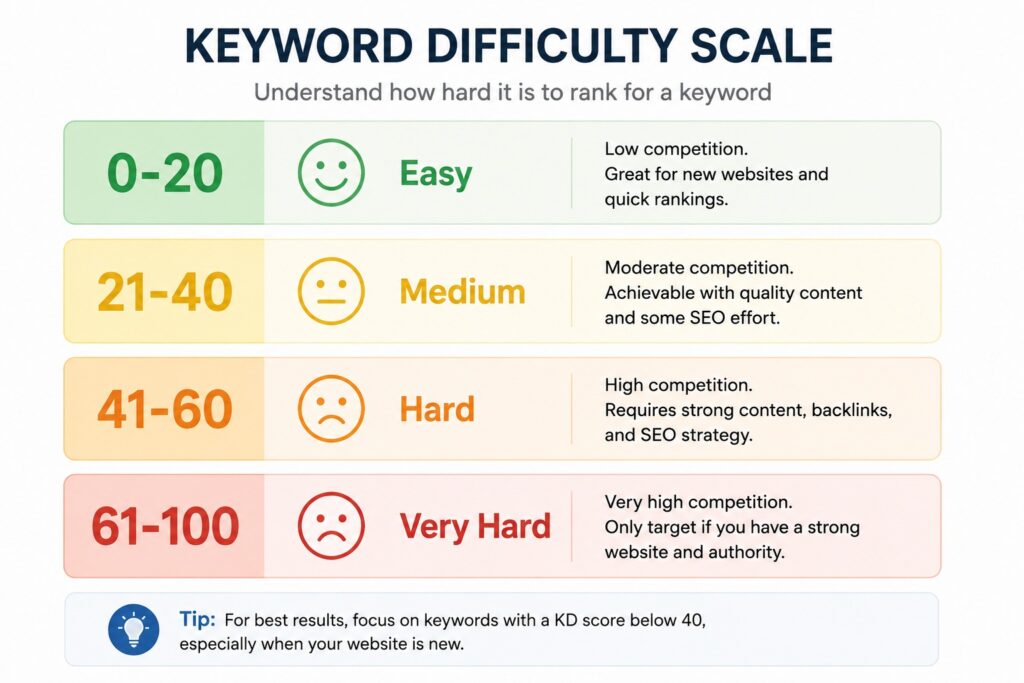
Keyword Difficulty Explained
Keyword difficulty (KD) is a score — usually on a scale of 0 to 100 — that estimates how hard it would be to rank on the first page for a given term. High-authority sites can compete at higher difficulty levels, but most newer websites should target keywords with a KD below 30.
For reference: “keyword research” has a KD of 68 — extremely competitive. “Free keyword research for beginners” has a KD of 14 — very achievable.
Long Tail Keyword Opportunities
Long-tail keywords are three to five-word phrases with lower search volumes but highly specific intent. They’re easier to rank for, attract more qualified visitors, and often convert at higher rates because the searcher knows exactly what they want.
Instead of targeting “keyword research” (very hard), start with “how to do keyword research for free” (KD 18) or “keyword research for small business” (KD 18). Over time, as your site builds authority, you’ll naturally start competing for more competitive terms.
“Long-tail keywords remain one of the fastest ways for new websites to gain organic visibility because they attract highly targeted visitors with clear intent.”
— Content SEO Consultant
SERP Weakness Analysis
Even a low-KD keyword can be hard to rank for if the current results are all high-authority sites with deep, comprehensive content. Before committing to a keyword, Google it and assess the results:
- Are the ranking pages thin or outdated?
- Do they directly answer the query?
- Are most results from large authority sites, or are some smaller sites ranking?
Weak SERPs with thin content or outdated articles are prime opportunities.
Step 7 – Group Keywords into Topic Clusters
What Is Keyword Clustering?
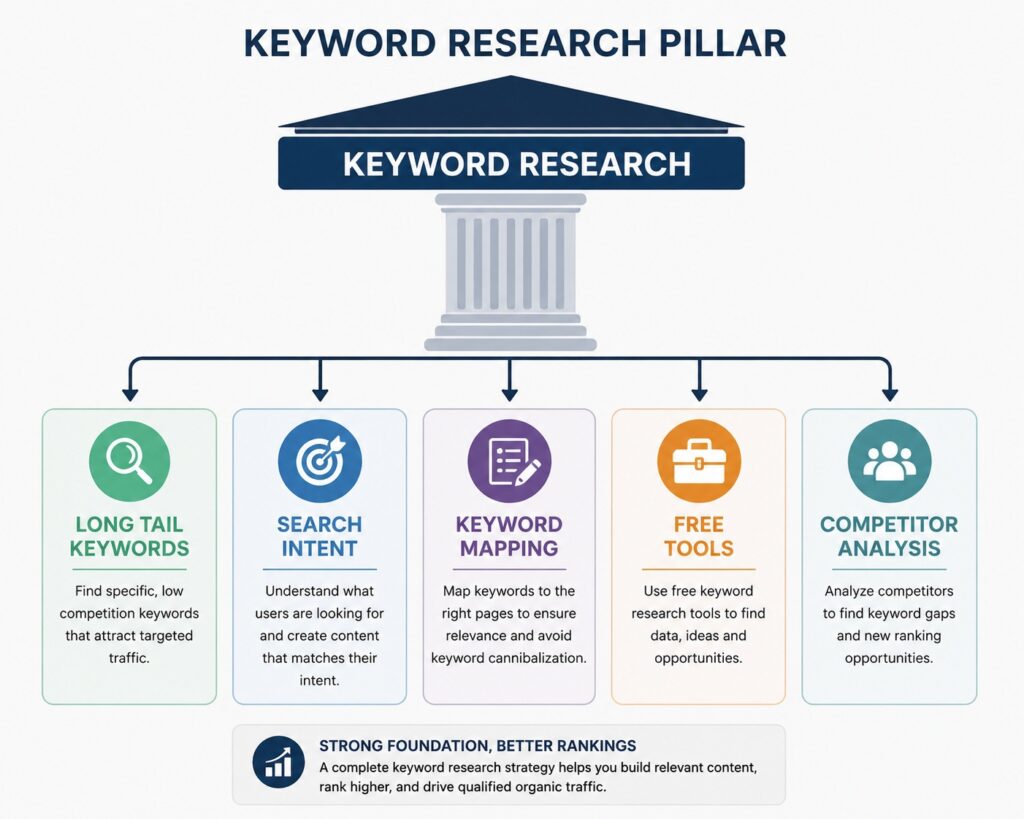
Keyword clustering is the process of grouping related keywords together and mapping them to a single piece of content (or a cluster of related content). Rather than creating separate pages for every slight variation of a query, you identify which keywords can be served by one comprehensive page — and which require their own dedicated content.
Creating Content Silos
A content silo (or topic cluster) consists of a central “pillar” page that broadly covers a main topic, supported by multiple “cluster” pages that go deep on specific subtopics. All pages link to each other, reinforcing topical relevance.
For keyword research, a content silo might look like:
- Pillar: Complete Guide to Keyword Research
- Cluster pages: How to Find Long-Tail Keywords, Search Intent Explained, Free Keyword Research Tools, Keyword Mapping Guide
Building Topical Authority
Search engines increasingly reward topical authority — the depth and breadth of your coverage on a subject — over individual keyword optimization. By building clusters, you signal that your site is a reliable resource on the topic, which helps all your pages perform better.
Step 8 – Create a Keyword Mapping Sheet
Assigning Keywords to Pages
Keyword mapping is the process of assigning specific target keywords to specific pages on your website. It prevents the same keyword from competing across multiple pages (a problem called keyword cannibalization) and ensures every page has a clear, focused purpose.
Your mapping sheet should include: URL, primary keyword, secondary keywords, search intent, and content status (planned, published, needs update).
Avoiding Keyword Cannibalization
Keyword cannibalization happens when two or more pages on your site target the same keyword, causing them to compete against each other in the search results. Google gets confused about which page to rank — and often ranks neither of them well. A keyword map prevents this by ensuring each keyword has one dedicated “home” on your site.
Content Planning
With your keyword map complete, you have a content calendar built on real data. You know what to write, why it matters, and which keywords each piece serves. That’s how you go from guessing to growing.
Best Free Keyword Research Tools Compared
| Tool | Best For | Free Plan |
| Google Keyword Planner | Search Volume Estimates | Yes |
| Google Search Console | Existing Site Keywords | Yes |
| Ubersuggest | Keyword Ideas + KD Scores | Limited |
| AnswerThePublic | Question-Based Keywords | Yes |
| Keyword Surfer | SERP Volume Data | Yes |
Each tool has a different strength. For the best results, combine at least two or three — Google Keyword Planner for volume, Keyword Surfer for in-SERP data, and AnswerThePublic for question mapping.
Common Keyword Research Mistakes
Chasing High-Volume Keywords
It’s tempting to target keywords with the highest search volumes. But if those keywords have a difficulty score of 70+, a new website will rarely rank for them — no matter how good the content is. Focus on realistic opportunities first, then build toward competitive terms over time.
Ignoring Search Intent
Optimizing a page for “keyword research tools” with a product listing when searchers clearly want a comparison guide is a mismatch of intent. Google will push down your page regardless of on-page optimization because the content doesn’t serve what users actually want.
Not Checking SERPs
Never commit to a keyword without reviewing the actual search results. The SERP tells you what type of content ranks, what format works (list vs. guide vs. video), and how much competition you’re really facing. This step takes two minutes and saves hours of wasted content creation.
Keyword Stuffing
Forcing a keyword into your content unnaturally — repeating it awkwardly to hit a density percentage — hurts readability and signals low quality to search engines. Write naturally. Cover the topic comprehensively. Keywords will appear organically.
AI SEO and Keyword Research in 2026
How AI Search Is Changing SEO
Google’s AI Overviews (formerly Search Generative Experience) have changed how results are displayed for informational queries. More answers are surfaced directly in the results page — which can reduce clicks to individual articles. But this creates a new opportunity: content that’s cited by AI Overviews or that ranks in featured snippets becomes even more valuable as a trust signal and brand visibility driver.
Entity-Based SEO
Modern SEO is increasingly entity-based. Google understands topics, not just keywords — it connects brands, concepts, and relationships. This means your content strategy should focus on comprehensively covering topics (building entities) rather than optimizing individual keyword strings.
Topic Authority vs Single Keywords
In 2026, a website that publishes ten deeply connected articles on keyword research will outperform one that publishes a single well-optimized post — even if that post targets all the right keywords. Topical authority is the new domain authority: it’s built by covering your subject with depth, breadth, and accuracy.
Optimizing for Google AI Overviews
To Optimizing for Google AI Overviews :
- Build E-E-A-T signals: demonstrate real experience, expertise, authoritativeness, and trustworthiness
- Structure your content with clear H2 and H3 headings
- Include direct answers to specific questions (great for PAA integration)
- Use concise, factually accurate statements in the first 100 words of each section
“In 2026, keyword research is no longer just about keywords. Understanding topics, entities, and user intent is what helps content rank in both traditional search results and AI-powered search experiences.”
— Digital Marketing Specialist
Keyword Research Checklist
Download the Keyword Research Checklist
Frequently Asked Questions
What is keyword research?
Keyword research is the process of finding and analyzing search terms that people use in search engines. It helps businesses identify topics, understand search intent, and create content that attracts organic traffic. By using free keyword research tools and analyzing search results, you can discover low-competition keywords and improve your SEO performance without spending money.
Can I do keyword research for free?
Absolutely. Tools like Google Keyword Planner, Google Search Console, Keyword Surfer, and AnswerThePublic provide substantial keyword data at no cost. While paid tools offer more data and convenience, free tools are more than capable of supporting a complete keyword research workflow — especially for small businesses and freelancers just starting out.
What is a good keyword difficulty score?
For websites with low to moderate domain authority, targeting keywords with a difficulty score below 30 is a strong starting point. Keywords between 30 and 50 are achievable with quality content and a few backlinks. Scores above 60 are typically reserved for established sites with significant authority.
How many keywords should I target per page?
Target one primary keyword per page, supported by two to five secondary keywords and several semantic variations. Trying to rank a single page for dozens of unrelated terms leads to unfocused content that serves no one well — and ranks poorly as a result.
What are long-tail keywords?
Long-tail keywords are longer, more specific search phrases — typically three or more words — that have lower search volumes but higher conversion potential. They’re easier to rank for, attract more qualified visitors, and often indicate stronger purchase or action intent. For new websites especially, long-tail keywords are the fastest path to organic traffic.
Which free keyword research tool is best?
There’s no single “best” tool — the most effective approach combines two or three. Use Google Keyword Planner for volume data, Google Search Console for existing site performance, and AnswerThePublic for question-based content ideas. Add Keyword Surfer as a browser extension for fast in-SERP data while you browse.
Final Thoughts
Keyword research doesn’t require a paid subscription, a big budget, or a team of SEO specialists. What it requires is a clear, repeatable process and the patience to follow the data rather than guessing.
Here are the core takeaways from this guide:
- Keyword research is free — the tools exist, and they’re capable
- Search intent matters more than volume — serve the right intent and rankings follow
- Long-tail keywords are your fastest wins — especially if your site is newer
- Topic clusters build authority — go deep on your subject, not just broad
- AI SEO is reshaping the landscape — optimize for entities and comprehensive coverage, not just keywords
Start with your seed keywords today. Run them through Google Autocomplete, check the People Also Ask section, load up AnswerThePublic, and build your first keyword map in a Google Sheet. You’ll have a content strategy grounded in real data — and that’s the kind of foundation that grows.

Rushikesh Gore is an SEO professional and digital marketing enthusiast with experience in Technical SEO, On-Page SEO, Link Building, and WordPress optimization. He regularly publishes content on SEO, freelancing, blogging, and online earning strategies. His work focuses on helping beginners build sustainable online income and improve website visibility.
Expertise: SEO, WordPress, Technical SEO, Freelancing, Blogging